
Open RTB 2.5 Bid Response
The response for a bid request will have the following structure:
Bid Response Object
| Attribute | Required? | Description |
|---|---|---|
| id | Yes | ID of the bid request, must match id sent in the request (string) |
| seatbid | Yes | Collection of bids made by the bidder on behalf of a specific seat. |
seatbid
| Attribute | Required? | Description |
|---|---|---|
| bid | Yes | ID of the impression object to which this bid applies, must match id sent in the request (string) |
seatbid.bid
| Attribute | Required? | Description |
|---|---|---|
| id | Yes | ID for the bid object chosen by the bidder (string) |
| impid | Yes | ID of the impression object to which this bid applies (string) |
| price | Yes | Bid price in CPM or CPC (float) |
| adm | Yes | Ad markup (string) |
| nurl | No | Win notification URL, it is recommended to use HTTP over HTTPS for nurl (string) - not mandatory |
| burl | No | Billing notification URL, called by EXADS when the impression or click becomes billable (CPM or CPC, per the btype field), so it can be counted from the billable event instead of the pixel. Recommended to use HTTP over HTTPS for burl (string) |
seatbid.bid.ext
| Attribute | Required? | Description |
|---|---|---|
| btype | Recommended | Pricing Model. Values: 1 = CPM, 2 = CPC. Default = 1 (int). Note: When response is for an Email Clicks zone request, 1 = Smart CPC. |
Note: Only Push Notification and Native ad formats may bid with the CPC pricing model.
JSON Examples
Banner, Popunder, Video, Push Notifications: JSON
{
  "id": "d4b5c697-41f3-4c1c-a3d5-5fd01b5ef2aa",
  "seatbid": [
    {
      "bid": [
        {
          "id": "e3852965cc7b28d03ff3069debcc83cb6d68e753",
          "impid": "974090632",
          "price": 3.19,
          "adm": "<EXADS_XML_OR_JSON_AD_MARKUP>",
          "ext": {
            "btype": 1
          },
          "nurl": "https://www.dsp-network.com/win_notification_url",
          "burl": "https://www.dsp-network.com/billing_notification_url",
          "cid": "5834901",
          "crid": "83232831"
        }
      ]
    }
  ]
}
Email Clicks JSON
{
    "id": "",
    "bidid": 123,
    "seatbid": [{
        "bid": [{
            "id": "12ab3d",
            "adid": 1,
            "impid": "",
            "price": 0.12,
            "adm": "https://www.dsp-network.com/tracker/impression",
            "ext":{
                "btype": 2
            },
            "burl": "https://www.dsp-network.com/billing_notification_url"
        }]
    }]
}
Direct Links
{
    "id": "",
    "bidid": 123,
    "seatbid": [{
        "bid": [{
            "id": "12ab3d",
            "adid": 1,
            "impid": "",
            "price": 0.12,
            "adm": "https://www.dsp-network.com/tracker/impression",
            "ext":{
                "btype": 2
            },
            "burl": "https://www.dsp-network.com/billing_notification_url"
        }]
    }]
}
Fullpage Interstitial (Mobile and Desktop) JSON
{
    "id": "d4b5c697-41f3-4c1c-a3d5-5fd01b5ef2aa",
    "seatbid": [
        {
            "bid": [
                {
                    "id": "54f6f08b2e323e32ea9ec4fd6944d652c842699a",
                    "impid": "974090632",
                    "price": 0.05,
                    "adm": "https://dsp-network.com/fpi-render.php?data=TVRjME9UZ31",
                    "ext": {
                        "btype": 1,
                        "asset_mime_type": [
                            "video/mp4"
                        ]
                    },
                    "nurl": "https://www.dsp-network.com/win_notification_url",
                    "iurl": "https://www.dsp-network.com/file/video.mp4",
                    "cid": "7561981",
                    "crid": "195600_115116261",
                    "cat": [],
                    "adomain": [
                        "www.adomain.com"
                    ],
                    "w": 900,
                    "h": 1600,
                    "attr": []
                }
            ]
        }
    ],
    "cur": "EUR"
}
Native: JSON
{
    "id": "d4b5c697-41f3-4c1c-a3d5-5fd01b5ef2aa",
    "seatbid": [
      {
        "bid": [
          {
            "id": "12ab3d",
            "impid": "1915966848",
            "price": 0.71,
            "nurl": "https://www.dsp-network.com/win_notification_url",
            "burl": "https://www.dsp-network.com/billing_notification_url",
            "adm": "<EXADS_JSON_AD_MARKUP_1>",
            "ext": {
              "btype": 1
            }
          }
        ]
      },
      {
        "bid": [
          {
            "id": "12ab3e",
            "impid": "1915966848",
            "price": 0.62,
            "nurl": "https://www.dsp-network.com/win_notification_url",
            "burl": "https://www.dsp-network.com/billing_notification_url",
            "adm": "<EXADS_JSON_AD_MARKUP_2>",
            "ext": {
              "btype": 1
            }
          }
        ]
      }
    ]
}
ADM Examples
The examples below shows examples of data used in this ADM parameter.
Banner: HTML
<a href=\"https:\/\/dsp.com\/click-tracker.php?data=H4sIAAAAA...8Da8a74VIAQAA\" target=\"_blank\" ontouchstart=\"\" onclick=\"var href='https:\/\/dsp.com\/click-tracker.php?data=H4sIAAAAA...8Da8a74VIAQAA'; this.href = href + '&clickX=' + event.clientX + '&clickY=' + event.clientY;\"><img width=\"300\" height=\"250\" src=\"https:\/\/adasset.dsp.com\/images\/uid123\/7fed7f2794236bc6544da662be1368a1f5d73e91.jpg\" border=\"0px\" style=\"\"><\/a><img src=\"https:\/\/dsp.com\/impression.php?data=TVRZM056UTVOak...2Y1Yw--\" width=\"1\" height=\"1\" border=\"0\" \/>
Popunder
https://dsp-network.com/tracker/impression
Video: XML
<?xml version="1.0" encoding="UTF-8"?>
<VAST version="3.0">
    <Ad id="5834901">
        <Wrapper>
            <AdSystem>www.ad-system.com</AdSystem>
            <VASTAdTagURI>
                <![CDATA[https://dsp-network.com/vast/inline.xml]]>
            </VASTAdTagURI>
            <Impression id="exotr">
                <![CDATA[https://dsp-network.com/tracker/impression]]>
            </Impression>
            <Error>
                <![CDATA[https://dsp-network.com/error?code=[ERRORCODE]]>
            </Error>
            <Creatives>
                <Creative sequence="1" id="83232831">
                    <Linear>
                        <TrackingEvents>
                            <Tracking id="prog_1" event="progress" offset="00:00:10.000">
                                <![CDATA[https://dsp-network.com/tracker/progress]]>
                            </Tracking>
                        </TrackingEvents>
                        <VideoClicks>
                            <ClickTracking>
                                <![CDATA[https://dsp-network.com/tracker/click]]>
                            </ClickTracking>
                        </VideoClicks>
                    </Linear>
                </Creative>
            </Creatives>
        </Wrapper>
    </Ad>
</VAST>
Native Ads: JSON
For native ads the adm parameter should contain a JSON encoded string like this:
{\"native\":{\"link\":{\"url\":\"https:\/\/dsp-network.com\/tracker\/impression\"},\"assets\":[{\"id\":1,\"required\":1,\"img\":{\"url\":\"https:\/\/dsp-network.com\/images\/myad.jpg\",\"w\":300,\"h\":300,\"ext\":{\"crop_anchor_point\":1}}},{\"id\":2,\"title\":{\"text\":\"Ad Title\"}},{\"id\":3,\"data\":{\"type\":2,\"value\":\"Ad description\"}},{\"id\":4,\"data\":{\"type\":1,\"value\":\"Ad brand\"}},{\"id\":5,\"ext\":{\"crop_anchor_point\":1}}],\"imptrackers\":[\"https://dsp-network.com/imptrackers?landingpage=1\"],\"eventtrackers\":[{\"event\":1,\"method\":1,\"url\":\"https://dsp-network.com/eventtrackers?landingpage=1\"}]}}
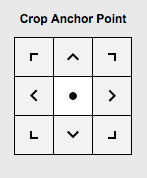
- crop_anchor_point: MIDDLE_CENTER = 0, TOP_LEFT = 1, TOP_CENTER = 2, TOP_RIGHT = 3, MIDDLE_LEFT = 4, MIDDLE_RIGHT = 5, BOTTOM_LEFT = 6, BOTTOM_CENTER = 7, BOTTOM_RIGHT= 8 (integer) - not mandatory
Which is based on the following JSON object:
{
    "native": {
          "link": {
              "url": "https://dsp-network.com/tracker/impression"
          },
          "assets": [
              {
                  "id": 1,
                  "required": 1,
                  "img": {
                      "url": "https://dsp-network.com/images/myad.jpg",
                      "w": 300,
                      "h": 300,
                      "ext": {
                          "crop_anchor_point": 1
                      }
                  }
              },
              {
                  "id": 2,
                  "title": {
                      "text": "Ad Title"
                  }
              },
              {
                  "id": 3,
                  "data": {
                      "type": 2,
                      "value": "Ad description"
                  }
              },
              {
                  "id": 4,
                  "data": {
                      "type": 1,
                      "value": "Ad brand"
                  }
              }
          ],
          "imptrackers": [
              "https://dsp-network.com/imptrackers?landingpage=1",
              "https://dsp-network.com/imptrackers?landingpage=2"
          ],
          "eventtrackers": [
              {
                  "event": 1,
                  "method": 1,
                  "url": "https://dsp-network.com/eventtrackers?landingpage=1"
              }, {
                  "event": 1,
                  "method": 1,
                  "url": "https://dsp-network.com/eventtrackers?landingpage=2"
              }
          ]
    }
}
Push Notification Ads: JSON
For Push Notification ads the adm parameter should contain a JSON encoded string like this (note that we use the 'native' object to implement push notification ads). Width and height depend on the width and height coming from request. Currently supported dimensions are 192x192 and 720x480. One image asset per notification.
{\"native\":{\"link\":{\"url\":\"https:\/\/dsp-network.com\/tracker\/impression\"},\"assets\":[{\"id\":1,\"required\":1,\"img\":{\"url\":\"https:\/\/dsp-network.com\/images\/myad.jpg\",\"w\":720,\"h\":480}},{\"id\":2,\"title\":{\"text\":\"Ad Title\"}},{\"id\":3,\"data\":{\"type\":2,\"value\":\"Ad description\"}}],\"imptrackers\":[\"https://dsp-network.com/imptrackers?landingpage=1\"]}}
Which is based on the following JSON object:
{
    "native": {
          "link": {
              "url": "https://dsp-network.com/tracker/impression"
          },
          "assets": [
              {
                  "id": 1,
                  "required": 1,
                  "img": {
                      "url": "https://dsp-network.com/images/myad.jpg",
                      "w": 720,
                      "h": 480
                  }
              },
              {
                  "id": 2,
                  "title": {
                      "text": "Ad Title"
                  }
              },
              {
                  "id": 3,
                  "data": {
                      "type": 2,
                      "value": "Ad description"
                  }
              }
          ],
          "imptrackers": [
              "https://dsp-network.com/imptrackers?landingpage=1"
          ]
    }
}
* Only one imptracker URL is allowed in the case of Push Notification ads * We use the 'native' object for push notification ads
No Bid Response
To answer a bid request without making an actual bid, an HTTP response code 204 "No Content" should be sent.
Billing Notification
If the parameter Bid Response Object -> Seat Bid Object -> Bid Object -> burl is in the bid response and is a valid URL, EXADS will send a GET request to it when the impression or click becomes billable (CPM or CPC, per the btype field). This allows the event to be counted from the billable server-to-server event rather than from pixel-based tracking.
If both nurl and burl are present, both will be called.