
Billable Event Counting (BURL)
EXADS RTB zones can count impressions and clicks based on billable events (BURL - billable notice URL) instead of the default pixel-based tracking. This lets supply partners reconcile their reported delivery against what is actually billable, and provides parallel "Served" metrics that show the gap between what was rendered and what was billed.
Concepts
| Term | Meaning |
|---|---|
Pixel impression (cimp) | Client-side impression tracker fired by the rendered ad. Today's default for counting impressions. |
| Pixel click | Client-side click tracker. Today's default for counting clicks. |
nurl | OpenRTB win-notice URL. Fired when the auction is won. Unchanged by this feature. |
burl | OpenRTB billing-notice URL. Fired when the winning bid becomes billable. |
| Billable event | The impression (CPM) or click (CPC) counted from the burl call instead of the pixel, per the btype pricing model. When BURL counting is enabled, the zone's Impressions / Clicks are counted from this event. |
| Served Impression / Served Video Impression | Pixel-counted (rendered) impression. Always recorded regardless of the BURL toggle. |
| Served Click | Pixel-counted (rendered) click. Always recorded regardless of the BURL toggle. |
Zone setting
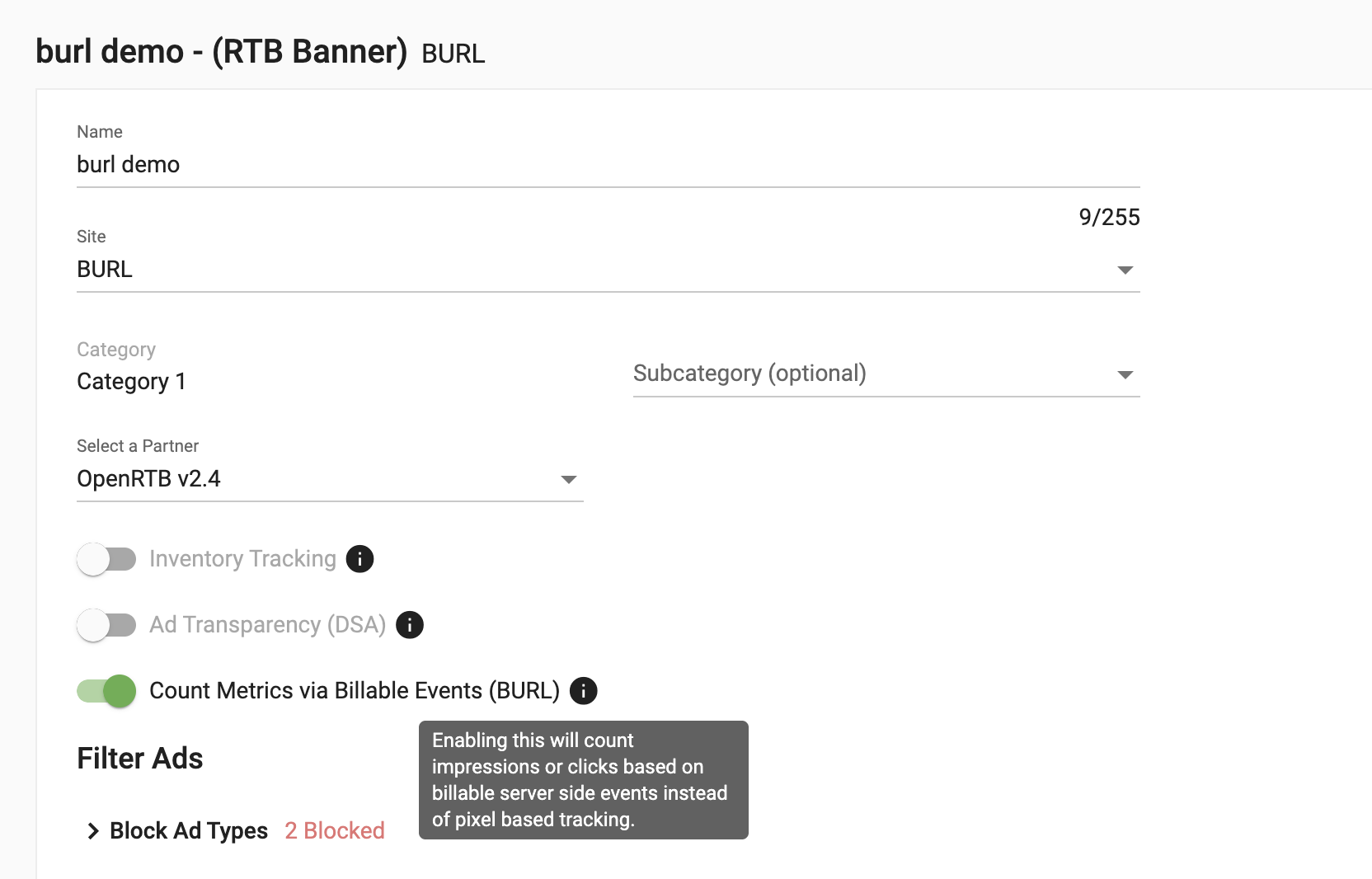
Each RTB zone using the OpenRTB 2.4 or OpenRTB 2.5 template exposes a toggle:
Count Metrics via Billable Events (BURL) — Enabling this will count impressions or clicks based on billable server side events instead of pixel based tracking.
- Located on the zone Create / Edit form, immediately below Select a Partner.
- Disabled by default.
- The setting is persisted, reloading the zone shows the saved value.
- Available only on zones with OpenRTB 2.4 or 2.5 templates. EXADS RTB and other zone types do not expose the toggle.
Counting logic
Impressions (CPM formats)
| Toggle state | Impressions / Video Impressions | Served Impressions / Served Video Impressions |
|---|---|---|
| BURL disabled | Pixel-counted (current behaviour) | Pixel-counted |
| BURL enabled | BURL-counted | Pixel-counted |
| BURL enabled, partner does not fire BURL | 0 | Pixel-counted |
Clicks (CPC formats)
| Toggle state | Clicks | Served Clicks |
|---|---|---|
| BURL disabled | Pixel-counted (current behaviour) | Pixel-counted |
| BURL enabled | S2S click notice | Pixel-counted |
| BURL enabled, partner does not fire BURL | 0 | Pixel-counted |
BURL request format
When BURL counting is in effect, EXADS performs a server-to-server GET to the BURL on the partner's bid response (or, in the chained case, the previous network in the chain). Conversely, when EXADS is the bidder, the SSP is expected to perform the same GET to the BURL EXADS includes in its bid response.
GET https://rtb.<network>.exads.rocks/burl.php?zid={zid}&data={encoded_data}&type={click|cimp}
| Parameter | Description |
|---|---|
zid | Zone ID from which the impression originated. |
data | Encrypted/encoded payload describing the impression or click. |
A 200 OK response is sufficient acknowledgement. EXADS does not require a body. There is no retry contract — partners are expected to fire BURL once when the impression becomes billable.
Multi-network propagation
When traffic flows across EXADS-powered networks, BURL propagates along the supply chain. Each network in the chain that has BURL-based counting enabled fires the BURL of the next network during its own BURL execution.
Direct zone ↔ Standard campaign on the same network
The ad-provider impression tracker registers both a billable event and a served event. The implementation may reuse the existing impression event and flag it for downstream processing rather than emitting two separate streamed events.
Direct zone on Network A ↔ RTB campaign from Network B
When Network A serves an RTB campaign from Network B and the RTB zone on B has BURL-based counting enabled:
- Network A registers both the billable and the served impression events through the ad-provider impression tracker.
- Network A calls Network B's BURL.
- Network B registers the billable impression when its BURL is called.
- Network B continues to register the served impression via standard tracking process.
If the RTB zone on Network B has BURL-based counting disabled, both billable and served impressions for Network B are registered during the standard tracking process (current behaviour).
Chained: Network A → Network B → Network C
When all three networks are EXADS-powered and Networks B and C have BURL-based counting enabled:
- Network A registers both billable and served impression events through the ad-provider impression tracker.
- Network A calls Network B's BURL.
- Network B registers the billable impression when its BURL is called by Network A.
- Network B calls Network C's BURL during its own BURL execution.
- Network C registers the billable impression.
- Networks B and C continue to register served impressions during standard tracking process.
If Network A is not EXADS-powered, downstream BURL-based billable counting depends on Network A supporting BURL propagation. If the upstream external network does not propagate BURL, downstream EXADS-powered networks relying on BURL-based counting will not receive billable impression data for that flow.
What stays on pixel tracking
- Frequency Capping. FC continues to rely on pixel events regardless of the BURL toggle.
- All "Served" metrics, by definition.
- Direct (non-RTB) zones, which have no BURL concept.
Partner expectations
- DSPs bidding into EXADS publisher RTB zones: include
burlin the bid response (alongsidenurl) to allow the publisher to count impressions via BURL. EXADS will fire it server-to-server when the impression becomes billable. Withoutburl, zones that have BURL-based counting enabled will countImpressions = 0for that demand source. - SSPs receiving EXADS bid responses: EXADS now includes
burlin its outgoing bid responses for OpenRTB 2.4 and 2.5. Fire it server-to-server when the impression becomes billable.
Troubleshooting & reconciliation
Because 'Served' metrics are pixel-counted (on display formats) while Impressions / Clicks reflect the billable event (when BURL is enabled), the two together let you locate where a discrepancy opens up, not just measure its size.
Served Ratio
The ratio of served (rendered) events to counted events shows how far rendering and billing diverge:
- Served Impressions Ratio =
Served Impressions/Impressions - Served Video Impressions Ratio =
Served Video Impressions/Video Impressions - For clicks, compare
Served ClicksagainstClicksthe same way.
A ratio close to 1 means rendered and counted events line up; a large gap points to events that rendered but weren't counted as billable (or the reverse), and is the signal to investigate.
Discrepancy bands
Discrepancies are normal in RTB; the goal is to keep them low enough for clean invoicing rather than to eliminate them.
| Discrepancy | Action |
|---|---|
| Under 5% | Acceptable |
| 5–10% | Monitor |
| Over 10% | Investigate |
Troubleshooting workflow
- Compare your counts against the partner's and use the Served Ratio to see where the gap opens.
- Segment by device and browser certain combinations (notably Android + Chrome) tend to run higher on discrepancy, because of how the browser handles navigation and redirects.
- Check the redirect method a header (
302) redirect is more reliable than a meta-refresh redirect. - Confirm the BURL and impression calls are firing as expected.
- For traffic that crosses multiple networks, reconcile each adjacent pair independently. Alignment between two nodes doesn't propagate across the whole chain.